The companion: design brief
هذا المحتوى غير متوفر بلغتك بعد.
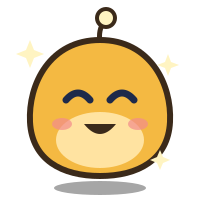
The companion is the face of Game Learning: a small friend who studies with you inside your games. It presents the questions, cheers, comforts, and later helps you in the game. It has one identity and a costume for each game.
Personality
Section titled “Personality”- Curious, warm and a little silly. It is the child’s study buddy, not a teacher: it is never disappointed, it says “let’s try again”.
- It loves knowledge: it gets excited by facts (“did you know…?”).
- It is brave in a small way: it wants to help you fight, even though it is tiny.
Shape and style (general look)
Section titled “Shape and style (general look)”- A small round body (a soft ball or a bean, slightly wider at the bottom), big eyes, a tiny mouth, small blush marks. No arms, or two tiny stubs. It floats (no legs), so it can follow the player anywhere.
- Silhouette first: it must be recognizable as a black shape at 48 pixels.
- Colors: one main color with a lighter belly. Suggestion: warm gold or amber (knowledge, light), with deep navy eyes. It must work on dark game backgrounds.
- Style: clean flat 2D vector, thick soft outline, simple shading (one shadow tone). Easy to animate.
- A small sign of learning: a tiny book-shaped leaf, a glowing dot (an idea light), or a little graduation-cap tuft on top. This one detail stays in every costume.
Moods (one drawing each, same proportions)
Section titled “Moods (one drawing each, same proportions)”| Mood | When | Look |
|---|---|---|
| Idle | Waiting | Gentle float, blinks |
| Happy | Right answer, greeting | Eyes closed as arcs, big smile, hop |
| Sad | Wrong answer, the player died | Droopy eyes, small frown, sinks |
| Talking | Speech bubble on screen | Mouth open and closed |
| Thinking | A question is on screen | Eyes looking up, a small “?” or dots |
| Cheering | A streak, a reward | Sparkles, a spin |
The Hollow Knight costume
Section titled “The Hollow Knight costume”Same body and eyes, so it is still clearly our companion, dressed in the game’s world:
- A white mask over the face with two small horns (like the bugs of Hallownest), keeping our big eyes as hollow black shapes.
- An ink-black body with a slightly ragged cloak edge at the bottom.
- The game’s mood: hand-drawn ink lines, muted blue-grey highlights, soft glow.
- The learning detail stays (for example the glowing idea dot becomes a pale soul light).
- Our own art only. Inspired by the game’s style; never traced or copied from its sprites.
The transformation (at save load)
Section titled “The transformation (at save load)”- It drops in from the top of the screen in its normal colors.
- It falls into darkness: it fades to a black silhouette and sinks.
- Ink splashes, and it comes back up in the Hollow Knight costume.
What the art needs to look like for the app
Section titled “What the art needs to look like for the app”- Layered SVG (preferred), with separate groups for the body, eyes, mouth, mask and horns, cloak, and extras, so the app can animate the parts. Or PNG parts at 512×512.
- One file per costume (
general.svg,hollow-knight.svg), with each mood as eyes and mouth variants inside it. - A transparent background.
- License: our own work, or made for us and given to the project under CC BY 4.0 or CC0, so it can ship in the open-source app.
The app already has a placeholder drawn in code (apps/desktop/src/renderer/src/Companion.tsx) with these moods and both costumes. The final art replaces its drawing; the behaviour stays.
Inside Hollow Knight the mod draws the companion itself, next to the Knight, so it also shows in exclusive full screen (issue #93). It uses the same drawing, rendered to small PNGs by pnpm --filter @game-learning/desktop render:companion (into integrations/hollow-knight/art/); render again whenever the drawing changes. The mod’s pictures get two touches the overlay does not: the mask and face turn a little to the right (a three-quarter view, so the mod can mirror it to look left), and a heavier, slightly wobbly ink outline, closer to the game’s hand-inked style.
How it behaves inside Hollow Knight
Section titled “How it behaves inside Hollow Knight”It should feel like one of the game’s own companions (Grimmchild, the weavers), not a sticker on the screen:
- In the world. It is a sprite in the game’s world, seen through the game’s camera, on the Knight’s sorting layer just behind it, so the game’s foreground and lighting cover it like any game object. A faint soul glow sits behind it. Only the speech bubble is drawn on the screen (always under the question cards). If the world sprite cannot be made, the mod falls back to drawing it on the screen as before.
- Looks where the Knight looks. It floats behind the Knight (the side the Knight does not face) and above it, looking the same way. When the Knight turns, it turns too with a quick squash-and-turn (it gets thin and a little taller, then comes back mirrored), not an instant flip.
- Moves like a pet. A critically damped spring toward its place: it trails a little, never bounces past, and hurries when it is far behind (a dash, a fall). A slow hover bob, a small lean in the direction it travels, and a faint soul trail when it moves fast. When the Knight jumps very far at once (a respawn, a room change) it vanishes in a small puff and reappears.
- Reacts to the Knight. Hit: it squeezes its eyes shut, jumps back and shakes. Focusing (healing): it glows, with a bright pulse when the health comes back.
- Reacts to the learning. A question card opens: it floats toward the card’s side of the screen and looks at the card. Right answer: hops; cheering: a spin and sparkles; sad: sinks. A soft sound from the game’s own menu plays when it cheers or is sad (at the game’s sound volume), if the game has that sound loaded.
- Idle. It blinks, and after a quiet while it glances the other way for a moment.
- Where it is (setting
companionPlace, also in the game’s menu):follow(default),corner(small, in the bottom-left corner of the screen, still reacting), orhidden(not drawn; the app window does not show its own either, so there is no companion at all). Changes apply at once. - Reduced motion (
reduceMotion): no bob, lean, trail, puffs or turn animation; it just appears. - It hides at menus, in cutscenes, during room transitions and in the pause menu.
Prompts for exploring styles (AI sketches)
Section titled “Prompts for exploring styles (AI sketches)”Use these to explore ideas, then redraw the chosen one cleanly. Use AI images only as sketches; the final art must be our own.
- “Cute small round floating mascot, big eyes, tiny smile, warm golden color with lighter belly, glowing dot on top like an idea light, flat 2D vector, thick soft outline, sticker style, white background, character sheet with happy, sad, thinking and talking expressions”
- “Same cute round mascot wearing a white bug mask with two small horns, ink-black body with a ragged cloak edge, hand-drawn ink style, muted blue-grey, dark fantasy cave background, 2D game art”
- “Chibi study buddy blob character for a children’s learning app, round, floating, big expressive eyes, tiny book-shaped leaf on its head, flat colors, game UI mascot, multiple poses”
Where to look for an artist
Section titled “Where to look for an artist”- Friends who draw. A school or university art club. Local game-dev communities.
- Commission sites, for a simple character sheet in 2 costumes. Ask for layered SVG files and a written license transfer (CC BY 4.0 or CC0).
- Hollow Knight fan-art communities (for the costume style). Ask, and credit.